RocketSender.co vs RocketSend.io: What’s the Difference?
RocketSender.co and RocketSend.io are two separate WhatsApp messaging products with different websites, Chrome extensions, and free-use policies. RocketSender.co offers a free website workspace for preparing bulk messaging tasks with Excel contacts, while RocketSend.io emphasizes extension-based messaging with AI Rewrite, AI Reply, and a free plan offering 100 messages per month.
Their similar names can cause confusion when searching for “Rocket Sender” or choosing a Chrome extension.
This comparison explains how to identify each product, compare their documented capabilities, and choose the workflow that fits your needs.
Editorial disclosure: This article is published by the RocketSender.co team. Product details were checked against official documentation on October 21, 2026. This is a documentation-based comparison, not an independent hands-on benchmark.
RocketSender.co vs RocketSend.io: How to Tell Them Apart
The simplest way to distinguish these products is to check their official domains, Chrome Web Store names, and extension IDs.
| Identification | RocketSender.co | RocketSend.io |
|---|---|---|
| Official website | rocketsender.co | rocketsend.io |
| Chrome extension name | Rocket Sender - Bulk WA Messages & Automation | WARocket |
| Extension ID | hmpoalkkjnapmpfgleamekjhhfenpodc |
jcfgjifalfldkffiklbhkkddhcpfehio |
| Main focus | Website-based bulk messaging task preparation | Extension-based messaging and AI assistance |
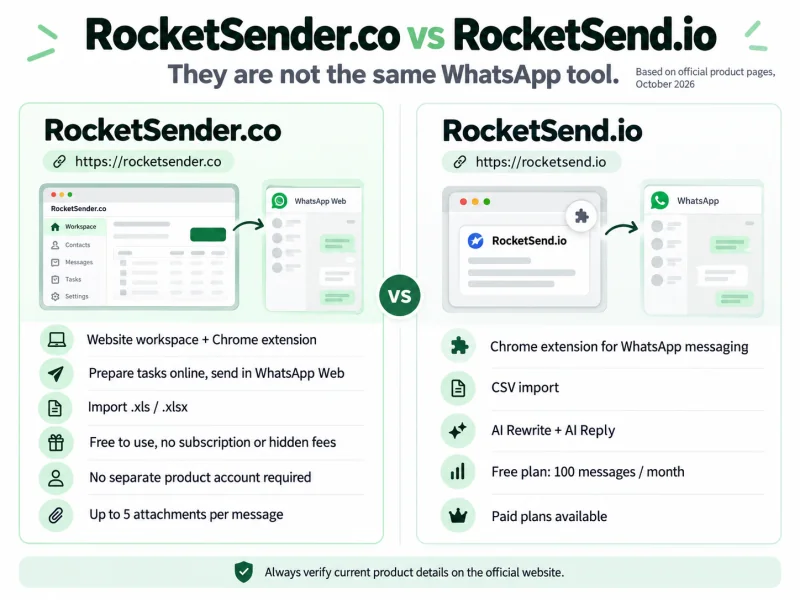
One detail matters: RocketSend.io uses the name “Rocket Sender” on its website, but its Chrome extension is named WARocket.
RocketSender.co offers a different extension called Rocket Sender - Bulk WA Messages & Automation.
The official RocketSender.co extension ID is hmpoalkkjnapmpfgleamekjhhfenpodc, while WARocket’s extension ID is jcfgjifalfldkffiklbhkkddhcpfehio.
These IDs provide a reliable way to distinguish the products even when their names appear similar in search results.
If you already have an extension installed, open chrome://extensions, select Details, and compare its ID with the table above.
You can install RocketSender.co’s official Chrome extension directly.
How Their WhatsApp Messaging Workflows Differ
Both products work with WhatsApp Web, but their documented workflows emphasize different tasks.
RocketSender.co: Prepare Bulk Messaging Tasks on a Website
RocketSender.co provides a dedicated website workspace where users can organize bulk messaging tasks before sending.
Instead of preparing every setting inside an extension popup, users can work in a full browser page.
The workspace provides:
-
New Task: Create a task and configure recipients, messages, attachments, and intervals.
-
Recipients: Enter numbers manually or import Excel spreadsheets.
-
Message: Prepare personalized content using Excel fields.
-
Drafts: Manage saved task preparations.
-
Sending: Monitor active tasks and control sending progress.
-
History: Review completed tasks and export available results.
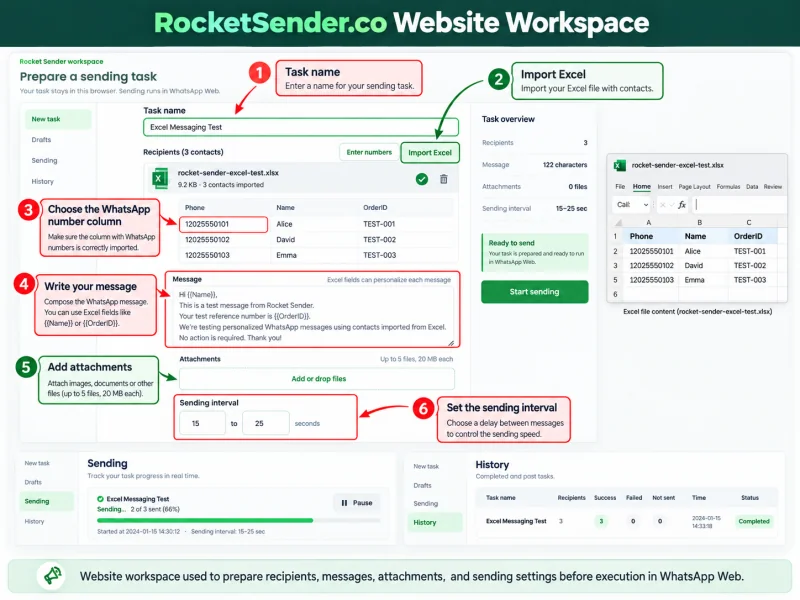
For example, a business preparing appointment reminders for customers who have opted in can import an Excel list, prepare personalized messages, and review sending settings in the website workspace.
Once the task is ready, the Chrome extension executes it through the user’s authenticated WhatsApp Web session.
The advantage is the dedicated space for preparing and managing bulk messaging tasks, rather than a claim that fewer clicks are always required.
RocketSend.io: Extension-Based Messaging with AI Assistance
RocketSend.io documents a Chrome extension-centered workflow with tools for composing messages and assisting with WhatsApp conversations.
Its advertised capabilities include:
-
CSV Upload: Import contacts and personalize messages with merge fields.
-
AI Rewrite: Improve or rephrase written messages.
-
AI Reply: Generate suggested responses using conversation context.
-
Quick Chat: Start a chat without saving a contact.
-
Privacy Mode: Blur sensitive information during screen sharing.
RocketSend.io also provides a web Dashboard for accessing account information and managing extension licenses. However, its documented WhatsApp messaging workflow primarily takes place within the Chrome extension.
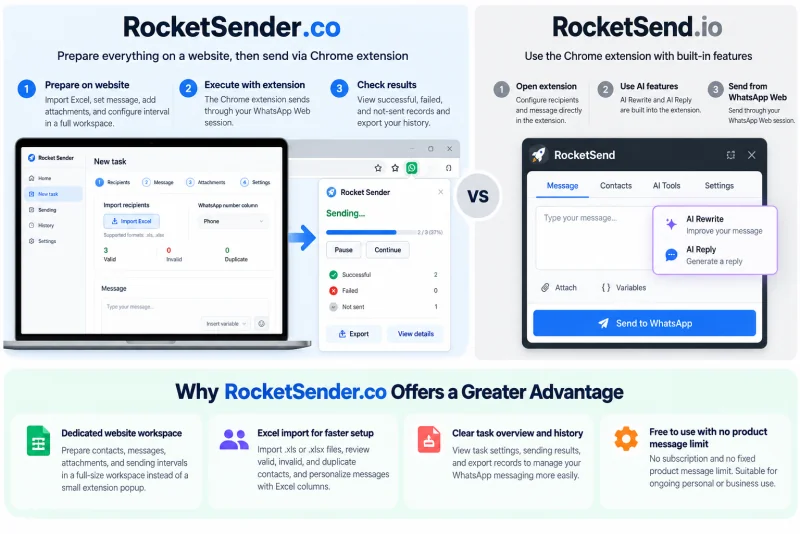
The distinction is one of emphasis: RocketSender.co provides a dedicated website workspace for organized bulk tasks, whereas RocketSend.io highlights extension-based messaging and AI assistance.
RocketSender.co vs RocketSend.io: Feature Comparison
The following table focuses on features documented by the products’ official websites.
| Feature | RocketSender.co | RocketSend.io |
|---|---|---|
| Documented workflow | Website task workspace + Chrome extension | WhatsApp Web Chrome extension |
| Spreadsheet import | .xls and .xlsx |
CSV |
| Personalization | Excel column-based fields | CSV merge fields |
| Attachments | Images, videos, documents | Images, PDFs, documents |
| Sending controls | Intervals, pause, resume | Custom message delays |
| Task management | Website task setup, progress tracking, result export | CSV-based sending and messaging controls |
| Additional highlighted features | Draft management and website task history | AI Rewrite, AI Reply, Quick Chat, Privacy Mode |
| Free-use policy | No fixed product message quota advertised | 100 messages/month on Free |
Based on publicly available official product documentation. Last verified: October 21, 2026.
Excel vs CSV Import
RocketSender.co supports .xls and .xlsx workbooks directly. Users can import their contacts into the website workspace, choose the phone number column, and use Excel fields for message personalization.
RocketSend.io documents CSV importing with merge fields.
For users who already maintain contact lists in Excel, direct workbook support can eliminate the need for CSV conversion.
This makes RocketSender.co a practical option for businesses that regularly work with Excel contact lists and want to prepare personalized WhatsApp messages without additional file preparation.
Bulk Task Preparation vs AI-Assisted Conversations
RocketSender.co is oriented toward preparing structured messaging tasks, configuring sending intervals, and reviewing progress.
RocketSend.io also supports bulk messaging but highlights AI tools for rewriting messages and suggesting replies.
Users managing spreadsheet-based communication may value an organized task workspace. Users frequently drafting or answering WhatsApp messages may find AI assistance more relevant.
These capabilities serve different needs rather than establishing a universal performance winner.
Free Plans and Message Limits Compared
Both products offer free use, but their published usage policies differ.
| Pricing detail | RocketSender.co | RocketSend.io |
|---|---|---|
| Free access | Yes | Yes |
| Subscription required for core use | No | No, within Free limits |
| Fixed product message quota | None advertised | 100 messages/month |
| Paid plans | No subscription advertised | Power User plans |
| Paid monthly message allowance | Not applicable | Unlimited advertised |
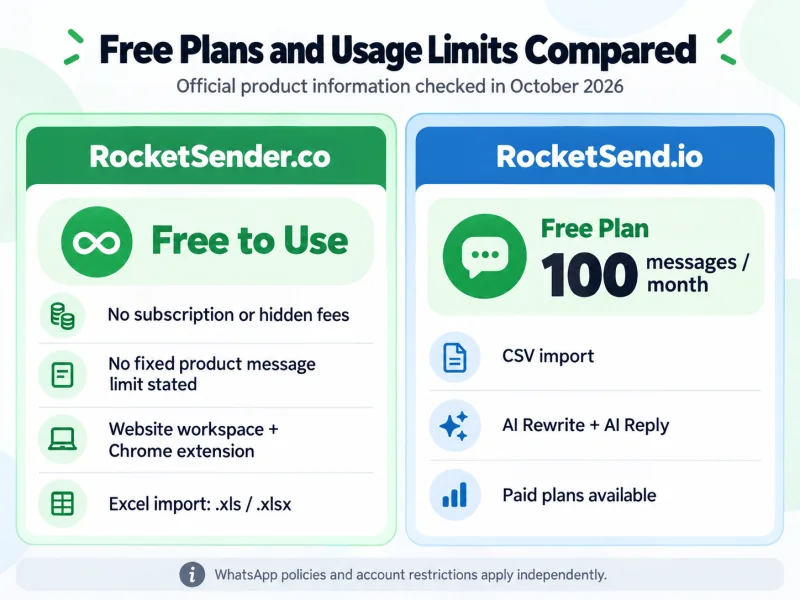
RocketSender.co: No Fixed Product Message Quota
RocketSender.co is free to use, with no subscription fees or fixed message quotas.
Users can prepare their messages, import contacts, and organize sending tasks through the website workspace without purchasing a separate product subscription.
This is particularly relevant for people who prefer a free WhatsApp sender with website-based task preparation.
RocketSend.io: 100 Free Messages per Month
RocketSend.io’s official pricing information lists a Free plan at $0 per month with 100 messages per month.
Its paid Power User plans advertise unlimited monthly messages, while the free allowance refreshes at month-end.
The 100-message limit applies to RocketSend.io’s Free plan, not its paid plans.
These are product-level limits. WhatsApp’s own messaging policies and account restrictions apply independently to both tools.
Pricing verified against RocketSend.io’s published pricing information on October 21, 2026.
Which Product Fits Your Needs?
Rather than selecting a tool based on its name, consider your main workflow.
| Your priority | Tool to consider | Documented reason |
|---|---|---|
| Prepare bulk tasks in a full website workspace | RocketSender.co | Dedicated task preparation |
Import Excel .xls or .xlsx directly |
RocketSender.co | Direct workbook support |
| Use a free tool without a fixed product message quota | RocketSender.co | No fixed message limit |
| Rewrite draft messages using AI | RocketSend.io | AI Rewrite |
| Generate AI-assisted replies | RocketSend.io | AI Reply |
| Start conversations without saving contacts | RocketSend.io | Quick Chat |
| Blur information when screen sharing | RocketSend.io | Privacy Mode |
| Use an official WhatsApp API integration | Neither | Evaluate the WhatsApp Business Platform |
RocketSender.co may suit users who want to prepare structured WhatsApp sending tasks on a website, especially when working with Excel contact lists.
RocketSend.io may suit users who prioritize AI-assisted message writing, customer replies, and chat productivity features.
The better choice depends on whether your primary need is task preparation or messaging assistance.
Frequently Asked Questions
Is RocketSender.co Related to RocketSend.io?
The products are presented separately, with different official domains, Chrome extension listings, and published product information. Their similar names do not establish a shared product or ownership relationship.
Is WARocket the Same as RocketSender.co?
No. WARocket is the extension associated with RocketSend.io.
RocketSender.co offers Rocket Sender - Bulk WA Messages & Automation, which has a different extension ID.
How Can I Confirm Which Extension I Installed?
Open chrome://extensions, select Details, and check the extension ID.
RocketSender.co’s extension ID is hmpoalkkjnapmpfgleamekjhhfenpodc. WARocket’s ID is jcfgjifalfldkffiklbhkkddhcpfehio.
Does RocketSend.io Have a Web Dashboard?
Yes. Its public Dashboard includes account and license activation functions.
RocketSender.co provides a website workspace specifically documented for preparing and managing bulk messaging tasks.
The publicly documented features do not establish identical functionality between the two dashboards.
Is RocketSender.co Legit?
RocketSender.co provides an official website and a Chrome Web Store listing associated with that domain.
You can verify its extension details and review the product’s privacy disclosures. A public listing alone does not guarantee security, delivery, or uninterrupted service.
Is RocketSend.io Safe to Use?
RocketSend.io publishes a privacy policy describing its data-handling practices.
According to that policy, when users activate certain AI-powered features, such as reply suggestions or message enhancement, relevant message content is sent to third-party AI providers to process the request.
The policy states that RocketSend.io does not retain the data sent for AI processing. This statement concerns RocketSend.io’s own practices and does not establish the independent retention policies of third-party providers.
Users should review the current privacy disclosures, extension permissions, and terms before using any third-party messaging tool with customer information.
Which Product Is Free?
Both offer free use.
RocketSender.co advertises no fixed product message quota, while RocketSend.io offers 100 messages per month on its Free plan, with paid upgrades available.
Final Recommendation
RocketSender.co may be a better fit for users who want a free WhatsApp sender with a dedicated website workspace, direct Excel importing, and structured task preparation.
RocketSend.io may be more suitable for users who prioritize AI Rewrite, AI Reply, Quick Chat, and Privacy Mode.
The most reliable way to distinguish the two products is to verify their official domains and Chrome extension IDs.
If you’re looking for the website-based task workflow described in this article, visit RocketSender.co to prepare your first WhatsApp sending task.
Verification and Corrections
Product information last verified: October 21, 2026.
If you notice outdated or inaccurate information in this comparison, please contact us at [email protected]. We welcome corrections and will review reported issues.
Product features and pricing may change over time.