
Import Contacts Easily
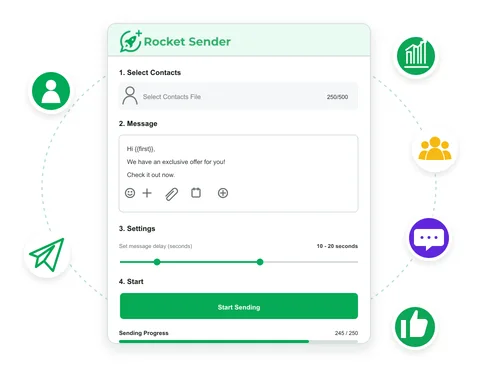
Import contact lists and organize recipients before sending bulk WhatsApp messages.
Rocket Sender combines a WhatsApp sender extension with a web dashboard for easier bulk campaign management on WhatsApp Web.
Add Rocket Sender to Chrome

Your task stays in this browser. Sending runs in WhatsApp Web.
Loading task workspace…
Run organized, easy-to-manage campaigns with a WhatsApp bulk message sender.
Import contact lists and organize recipients before sending bulk WhatsApp messages.
Add contact variables to personalize messages for every recipient.
Attach images, videos, and documents to make each message more useful and relevant.
Set sending intervals and pause or resume anytime to keep your campaigns under control.
Follow sending progress in real time and review successful, failed, and not-sent results.
Work in a larger browser workspace instead of a small extension window, then continue to WhatsApp Web when you're ready to send.
Preview the dashboard, sending controls, and live campaign progress before you start.
 Contact list and campaign overviewMessage and attachment setupSending interval controlsLive progress and result tracking
Rocket Sender keeps your WhatsApp bulk messaging workflow inside WhatsApp Web.
Add Rocket Sender to Chrome.
Start a new bulk messaging campaign.
Import contacts, personalize messages, add attachments, and set sending intervals.
Continue through the extension and launch your campaign.
See what Chrome Web Store users say about Rocket Sender as a bulk WhatsApp sender.
 Chrome Web Store Reviews
Read verified feedback from Rocket Sender users.
View Chrome Web Store Reviews
“a extension which enable one to msg a bulk numbers without saving really great!”

“Good app to send multiple Messages to customers”

“Nice. Easy to install and use.”

Quick answers about Rocket Sender, a free WhatsApp sender for WhatsApp Web.
Rocket Sender is a free Chrome extension that adds WhatsApp bulk messaging tools directly to WhatsApp Web, with no API or separate Rocket Sender account required.
Add or import your recipients, prepare your message, set a sending interval, and start the queue in WhatsApp Web with Rocket Sender.
Yes. Rocket Sender is a free bulk WhatsApp sender with no subscription or fixed message limit. Users should manage sending volume and intervals responsibly and follow WhatsApp’s terms to reduce account risk.
Rocket Sender lets you set sending intervals within an active send queue. It does not schedule messages for a specific future date or time.
Yes. Upload .xls or .xlsx files and use column headers as personalization variables in your message.
Supported image, video, and document formats can be attached before starting the send queue — up to five files per message.
Check your WhatsApp Web connection, contact number format, attachment size, and whether another similar extension is running. Refresh WhatsApp Web and try again if needed.
Rocket Sender works as a third-party extension with WhatsApp Web. Use it in accordance with WhatsApp's terms and policies.
Yes. The web dashboard is used to prepare and manage campaigns, while actual sending still takes place through the Chrome extension in WhatsApp Web.
Spend less time on repetitive sending and keep your outreach organized.
 Add Rocket Sender to Chrome


